
Trading XAU/USD on FxPro from order to exit
Finding gold in the terminal, sizing the order with our calculators, and setting the exit with the entry are the three moves that matter.
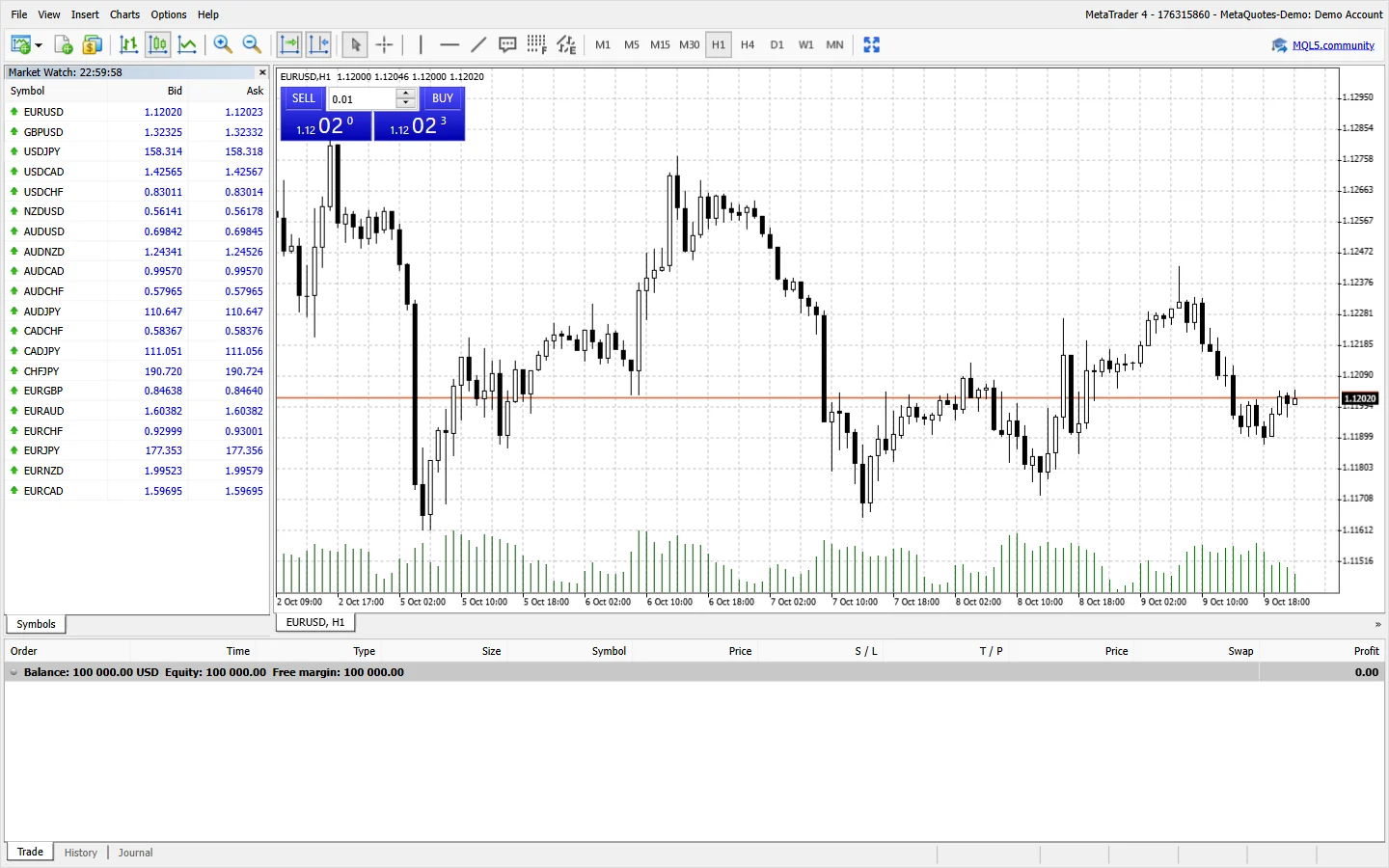
Finding XAU/USD in the terminal
Open the Market Watch window in MT4 or MT5 by pressing Ctrl+M, then right-click inside the window and choose Show All to display every instrument. Gold is listed as XAUUSD or XAU/USD under the metals group, and you can drag it onto the chart or right-click and select Chart Window. In cTrader, type XAUUSD into the search bar at the top of the left-hand watchlist, and the pair appears instantly.
If you do not see gold, your account may be on a platform that limits the instrument list, or you may need to enable trading on metals in the client area. FxPro offers gold as a CFD on spot XAU/USD, and one standard lot is 100 ounces. The reference price around 4275.0 means one standard lot has a notional value of about $427,500, which is why position sizing matters before you click buy.
Sizing the order with our calculators
Before you enter a gold trade, decide the rand risk you are willing to take and use the Rand Bullion position size calculator. Enter your account balance in rand, the stop-loss distance in pips or dollars, and the risk percentage, and the calculator tells you the lot size to use. For gold, one pip is 0.01, so a move from 4275.00 to 4275.50 is 50 pips, and the pip value on a 0.10 lot is about R9 per pip depending on the USD/ZAR rate — our pip value calculator gives the exact number.
The margin calculator then shows how much of your balance is locked for that position. At 1:200 leverage, a 0.10-lot gold trade needs roughly R3,200 margin; at 1:500 for eligible clients it is about R1,300. If your margin level drops too low, the broker may close the trade automatically, so keep the margin requirement below 10% of your balance for comfort. The profit calculator shows the rand profit or loss at your target and stop, which removes the guessing before you place the order.
Setting the exit with the entry
Place the order as a market order or a pending limit/stop order, and attach a stop-loss and take-profit at the same time. In MT4 or MT5, you can set these directly in the order window before clicking buy or sell; in cTrader, use the order ticket and tick the stop-loss and take-profit boxes. A stop-loss is not optional on gold, because the market can gap over weekends and a small position can turn into a large loss without one.
Decide the exit before the entry: choose a stop distance in pips that matches your risk, and a take-profit that gives at least a 1:1.5 reward-to-risk ratio. For example, if you risk 30 pips on a 0.10 lot, the stop is about R270, so the take-profit should be at least 45 pips away for a R405 gain. Do not move the stop further away after entry — that is the fastest way to break your own position sizing rules. Our profit calculator lets you test different exit levels before the trade is live.
How to identify the correct XAU/USD symbol on FxPro platforms
The correct symbol for trading gold against the US dollar on FxPro is XAU/USD, but you may see several similar-looking symbols because the platform offers gold priced in different currencies and with different contract specifications. Symbols like XAUUSD, GOLD, or XAUUSD.a might appear in the Market Watch, and each can point to a different underlying contract or pricing source. Always confirm the symbol description shows “Gold vs US Dollar” and the contract size of 100 oz before placing an order, as using the wrong symbol can affect your margin calculation and pip value.
FxPro lists multiple gold symbols to cater to accounts denominated in different currencies and to separate spot gold from futures or other variants. For example, XAUUSD is the standard spot symbol for USD accounts, while XAUAUD or XAUZAR might be available for accounts in Australian dollars or South African rand. These cross-currency symbols still track the same global gold price, but your profit and loss is converted into your account currency at FxPro’s prevailing rate, which can introduce a small conversion difference. Stick to XAUUSD if you want the most liquid and straightforward exposure.
You can find the right symbol by typing “XAU” into the Market Watch search box on MT4 or MT5, or by using the symbol search in cTrader and FxPro Edge. If you see multiple results, right-click and select “Specification” to view the contract size, margin currency, and trading hours. The symbol with contract size 100 and margin currency USD is the standard spot gold contract. If your account is in ZAR, you can still trade XAUUSD; your P&L will be converted to rand at the close of each trade, but the margin requirement is calculated in USD and then converted.
What one standard lot of gold means in ounces and pips
One standard lot of XAU/USD on FxPro represents 100 troy ounces of gold, and a one-pip movement is defined as a change of 0.01 in the price. For example, if the price moves from 4275.00 to 4275.01, that is one pip, and the value of that pip for one standard lot is $1. This fixed pip value makes it easy to calculate risk: a 50-cent move in gold equals 50 pips, which equals $50 per standard lot. The contract size of 100 oz never changes, regardless of your account currency or the leverage you choose.
Because one lot is 100 oz, the notional value of a position at a reference price of 4275.0 is $427,500. You do not need to have that amount in your account; leverage lets you control that much gold with a fraction of the value as margin, but your profit and loss is based on the full $427,500 notional. At a 0.10 lot size, which is 10 oz, the notional value is $42,750, and the pip value is $0.10. This linear scaling means you can fine-tune your exposure to match your rand risk budget precisely.
Understanding the contract size protects you from accidental oversizing. A common mistake is to enter 1.00 lots thinking it is a small trade, only to find each pip is worth $1 and a normal daily move of 100 pips is $100. Before you trade, decide the maximum rand amount you are willing to lose, convert that to USD, and divide by the pip value per lot to get the maximum lot size. For example, if your risk is R500 and the USD/ZAR rate is 18.5, that is about $27, which at $0.10 per pip for 0.10 lots allows a 270-pip stop.
Why the stop loss is set at the moment of entry on FxPro
Setting a stop loss at the moment of entry, rather than after the trade is live, is the only way to guarantee your maximum loss is capped from the first second. On FxPro’s platforms, you can attach a stop loss to a market order or a pending order before it is executed, and the platform will then enforce that exit automatically if the price moves against you. If you wait until after entry, even a few seconds of adverse movement can push your loss beyond your planned risk, especially in fast gold markets where price can gap or spike on news.
A stop loss entered with the order is also protected from your own hesitation or technical issues. Once the order is placed with a stop attached, you do not need to monitor the screen continuously or worry about internet disconnection; the stop resides on FxPro’s servers and will trigger regardless of whether your terminal is open. This is particularly important for overnight positions or when trading gold during volatile sessions. You can modify the stop later, but having it in place from the start ensures discipline and removes emotional decision-making under pressure.
On MT4, MT5, cTrader, and FxPro Edge, the order window has a field for stop loss where you can enter either a price level or a distance in pips from the entry. For a buy order, the stop must be below the current price; for a sell order, above it. FxPro will reject the order if the stop is too close to the market, depending on the minimum stop distance for gold, which can vary with volatility. Therefore, calculate your stop based on your risk per trade and the pip value, then enter it at the same time you enter your position.
How the swap line is calculated for an overnight gold position
The swap line on an open XAU/USD position is the interest adjustment applied when you hold a trade past 22:00 server time (usually 00:00 South African time, depending on the season). The swap is not a fixed number; it depends on the interest rate differential between the US dollar and the gold lending rate, plus FxPro’s own markup. It can be positive or negative: if you are long gold and the swap is negative, you pay a small amount each night; if you are short and the swap is positive, you might receive a credit. The exact amount per lot is shown in the contract specification for the symbol.
The swap is charged in USD per standard lot, and it is tripled on Wednesday to account for the weekend, since no swap is applied on Saturday and Sunday but the position remains open and accrues interest. For example, if the swap long is -2.5 and swap short is +1.0, holding one standard lot long overnight would deduct $2.50 from your account, while holding short would add $1.00. These numbers are not fixed and can change daily based on market rates, so always check the current swap before leaving a position open overnight.
Because the swap is per lot, a smaller position size reduces the swap proportionally: 0.10 lots would incur one-tenth of the standard lot swap. For a trader in South Africa, the swap amount in USD is converted to ZAR at the prevailing rate and appears as a separate line in your account history. If you are planning to hold gold for several days or weeks, the cumulative swap can become a meaningful cost or income, so factor it into your strategy. You can view the current long and short swap rates in the symbol specification on any FxPro platform.
How to read the contract specification for XAU/USD before trading
The contract specification for XAU/USD on FxPro gives you the exact trading conditions you need, including contract size, minimum and maximum lot size, margin percentage, swap rates, and trading hours. You can access it by right-clicking the symbol in Market Watch on MT4 or MT5 and selecting “Specification”, or by finding the symbol details in cTrader and FxPro Edge. The specification is static for contract size and pip value, but margin requirements and swaps can change, so it is worth checking before each trading session.
One key line in the specification is “Margin percentage” or “Margin currency”, which tells you how much of the notional value you need to deposit as margin. This percentage is derived from the maximum leverage available on your account, but it is expressed as a percentage rather than a ratio. For example, with leverage of 1:200, the margin percentage is 0.5%, meaning a 0.10-lot position with notional $42,750 requires $213.75. The specification will show the margin calculation method and any minimum margin requirements, so you can plan your position size without guesswork.
The specification also shows the “Swap long” and “Swap short” values, which are the daily interest adjustments for holding positions overnight. These values are given in USD per standard lot and can be positive or negative. Additionally, look for “Stop level” or “Minimum stop distance”, which tells you how far from the current price your stop loss must be placed. For gold, this is often around 30 pips but can widen during news. Understanding all these fields prevents order rejections and unexpected costs, making the specification your first stop before trading XAU/USD.
What margin is required for a gold position with FxPro’s South African leverage cap
The margin required for a gold position depends on the leverage cap that applies to your FxPro account, which for South African retail clients is up to 1:200, while eligible professional clients can access up to 1:500. The cap is a maximum, not a target, and you can always choose lower leverage. At 1:200, the margin requirement is 0.5% of the notional value, so for one standard lot of XAU/USD at a reference price of 4275.0, the notional value is $427,500 and the margin is $2,137.50. For a 0.10-lot position, the notional is $42,750 and the margin is approximately $85.50, as stated in the provided facts.
Your account currency in rand does not change the margin calculation; the margin is calculated in USD and then converted to ZAR at FxPro’s prevailing exchange rate when the position is opened. This means the rand amount you need in your account will fluctuate slightly with the USD/ZAR rate. For example, if the USD/ZAR rate is 18.5, the $85.50 margin for a 0.10 lot would be about R1,582. You must have at least this free margin in your account to open the trade, and you should keep additional buffer to avoid a margin call if the price moves against you.
Because leverage is a cap, you can reduce your risk by using a lower effective leverage. If you choose to risk only 1% of your account on a trade, your position size will be far smaller than what the maximum leverage allows. The margin requirement is not the amount you can lose; your actual loss is determined by the stop loss distance and pip value. Always calculate your stop loss first, then determine the lot size based on your rand risk budget, and finally check that the required margin is a small fraction of your account equity so that a normal adverse move does not trigger a margin call.
Why FxPro shows more than one XAU/USD symbol and which one to use
You will typically see several XAU/USD symbols in FxPro’s terminals because the broker offers gold across different account types, execution models, and platform-specific suffixes, so the correct symbol is the one that matches your live account’s trading conditions and the platform you are actually using. On MT4 and MT5, look for symbols ending in your account suffix, such as XAUUSD or XAUUSD.a, while cTrader may show a plain XAUUSD; the FxPro Edge web platform can display a separate listing. Always confirm the symbol against your account email or the contract specification before placing an order, because using the wrong one can mean different spreads, margin requirements, or no execution at all.
The presence of multiple XAU/USD entries is not a fault but a consequence of how FxPro segregates pricing for retail, professional, and demo environments, so the symbol you choose must align with the entity that actually serves your South African account. A symbol intended for a UK or EU entity may still appear in a global watchlist, but your orders on it would be rejected or routed under different terms, so the practical step is to open the symbol’s specification and check the margin currency, contract size, and trading hours match what your account summary states. Since FxPro Markets Direct Costa Rica Latam SRL is the relevant entity for most South African clients, the symbol offered for that entity is the one to trade, and if in doubt, use the search function inside the platform and select the symbol with the correct suffix shown in your account confirmation.
To find the right XAU/USD symbol quickly, open the Market Watch or Symbols panel in your platform, type XAU in the search bar, and compare the full names against the account type you are logged into, because each symbol’s suffix or prefix encodes the liquidity pool and account conditions. A zero-suffix symbol is often the standard retail one, while suffixes like .a, .b, or .pro indicate alternative feeds, and a demo account will show still another variant; trading the demo symbol on a live account is impossible, so check the account number shown in the platform’s title bar. Once you have identified your symbol, right-click it and choose Specification to confirm the contract size is 100 ounces and the pip size is 0.01, then add it to your favourites to avoid selecting the wrong line in future sessions.
What one standard lot of gold means for your rand risk
One standard lot of XAU/USD is a contract for 100 troy ounces of gold, so each one-cent move in the price, which is one pip at 0.01, changes the position’s value by exactly $1, and that dollar amount must be converted to rand at the prevailing USD/ZAR rate to see your true local exposure. At a reference price around 4275.0, a single standard lot represents a notional value of about $427,500, which is roughly R8 million or more depending on the exchange rate, yet the margin required is only a fraction of that because leverage is applied. For a South African retail client using the maximum available 1:200 leverage, a 0.10-lot position needs about $85.50 margin, and a full lot would need ten times that, but the margin is not your maximum loss.
The contract size of 100 ounces is fixed by the broker’s symbol specification, so when you place an order for 1.00 lots, you are committing to the profit or loss of $1 per pip movement, and that $1 per pip becomes a rand amount that fluctuates with the exchange rate throughout the trading day. If USD/ZAR is at 18.50, one pip is worth about R18.50; if it moves to 19.00, that same pip is worth R19.00, so your risk in rand terms is not constant even if your stop distance in pips is fixed. This matters because a 100-pip stop on a full lot would be a $100 loss before costs, which is over R1,800, and that is before considering spread or slippage, so sizing in lots should always be done after converting the dollar risk into rand.
Because one lot equals 100 ounces and one pip equals $1, the margin and risk scale linearly with lot size, but the psychological pressure does not, and in South Africa the rand’s volatility can amplify the feeling of loss even when the dollar loss is small. The maximum leverage of 1:200 for retail clients is a cap, not a recommendation, and using it on a full lot means a margin of roughly $2,137.50 at the reference price, which is a large sum in rand for most traders; a 0.10 lot needs only about $85.50 and moves the P&L by $0.10 per pip, or about R1.85 per pip at an 18.50 exchange rate. Before entering any gold trade, check the contract specification to confirm the lot size is 100 ounces and the pip size is 0.01, then use a position size calculator that accepts your rand account balance and the stop distance to avoid overleveraging a single trade.
checked 2026-07-09 · fxscouts.co.za/broker/fxpro; sashares.co.za/fxpro-review; fxpro.com/about/licences
Move from reading to trading
FxPro gives South African traders MT4, MT5, cTrader and a mobile app on MT4, MT5, cTrader and a mobile app. FxPro is licensed by the FCA (UK) and CySEC, and an FxPro entity holds an FSCA licence in South Africa — check which entity your own account is opened with.
Review FxPro execution →